
Find what you watched on Netflix. Rank it when you’re ready.
Download your Netflix viewing activity as a CSV, then choose it in Ranked. The films and shows become a starting point for your list. No streaming password to share, no automatic ratings and no need to rank everything at once.
1. Get the file from Netflix
- In Safari or another browser, open Netflix viewing activity and sign in to Netflix.
- If you land on Account, open Profiles, choose your profile and open Viewing activity.
- Scroll to the bottom and select Download all. It downloads a CSV. On iPhone, find it in your browser’s Downloads or the Files app.
Netflix exports one profile’s viewing history. If your membership is inactive, Netflix directs you to its information-download process instead. These steps follow Netflix’s own viewing-history instructions, checked October 24, 2026.
2. Choose the CSV in Ranked
- Open You › Settings › Find what you’ve watched.
- Choose Netflix, then Choose your export.
- Select the CSV you downloaded. Keep using the app while Ranked looks up the titles.
You do not need to edit the spreadsheet. Keep the original title and date columns. A screenshot, PDF or renamed spreadsheet is not a Netflix CSV export.
3. Check the matches
Names are not always unique. Under Choose the right title, confirm the right film or show, pick another match or say I didn’t watch this. A shared Netflix profile can include someone else’s viewing; it does not have to become your list.
Recognised episodes become one show. A rewatch does not create a second copy. If a match is uncertain, Ranked leaves the decision to you.
4. Place a few, then come back later
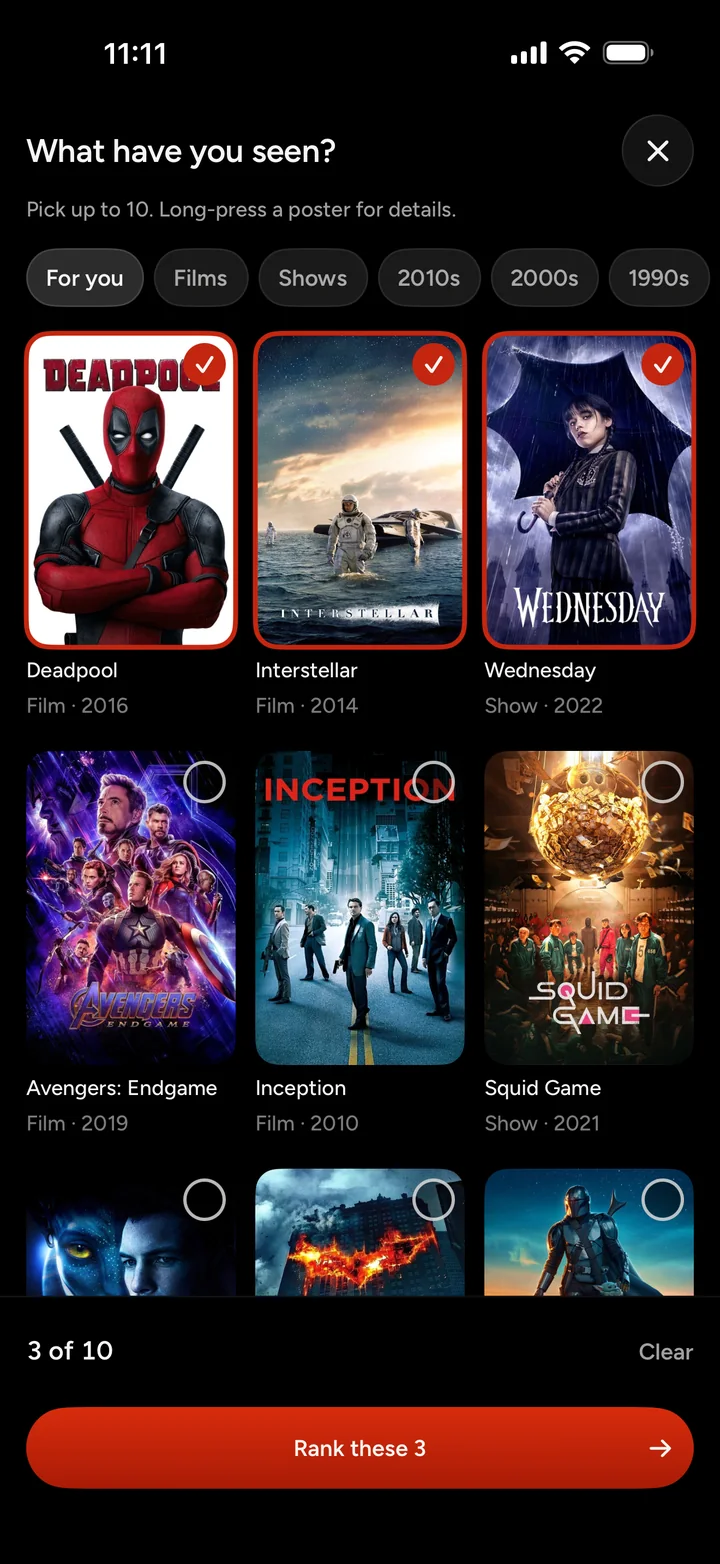
Matched titles wait under Ready to rank in the import screen and From your history in Discover. Open Rapid Ranked to place a batch, or take them one at a time. Films and shows stay on separate lists.
If something looks wrong
- Can’t find Download all? Check the browser page, not the Netflix app, and look below the viewing list.
- The wrong titles? Check which Netflix profile supplied the file, then dismiss entries you did not watch.
- A title is missing or ambiguous? Search for it manually. Title names and catalogue matches are not perfect.
- Want to start over? Remove Netflix import clears entries supplied only by that import. Titles already ranked stay on your list.
Imported titles stay on this iPhone only. They are not synced or backed up, and signing out removes them. Titles you have already ranked stay on your account.
Questions
- Can I download the history from the Netflix app?
- Use Netflix in a web browser. Open Account, choose a profile under Profiles, then Viewing activity. Download all is below the list and saves a CSV.
- Will this automatically rank everything I watched?
- No. An export says what played on a profile, not what you liked. Imported titles wait for you to rank them. Nothing is posted just because you imported a file.
- What if other people use my Netflix profile?
- Choose your own profile before downloading. If a title is not yours, use I didn’t watch this in Ranked rather than ranking it. You can check uncertain matches before they are accepted.
- What happens to episodes and repeated viewings?
- Recognised episode entries are grouped under their show. Repeated titles are deduplicated. Ranked ranks the show as a whole, not each episode, and ambiguous matches need your confirmation.
- Does Ranked get my Netflix password or keep syncing?
- No. You sign in on Netflix’s own website and select the file yourself. To bring in later viewing, download a fresh export and import it again.
- Where does my import live?
- Imported titles stay on this iPhone only. They are not synced or backed up, and signing out removes them. Titles you have already ranked stay on your account.
Bring the history. Build your list.
Download on the App StoreRanked is for iPhone, for people 18 and over.
Netflix is a trademark of Netflix, Inc. Ranked is not affiliated with, endorsed by or connected to Netflix.